Software for photo improvement
Although the new digital cameras do a great job, there are difficult
lightning conditions in which they fail more or less. Also you want
sometimes to crop your pictures to get a better composition or
remove unwanted objects, like power lines in the front of a
beautiful temple. For this kind of improvement, there are many photo
improvement programs which can do even much more then this.
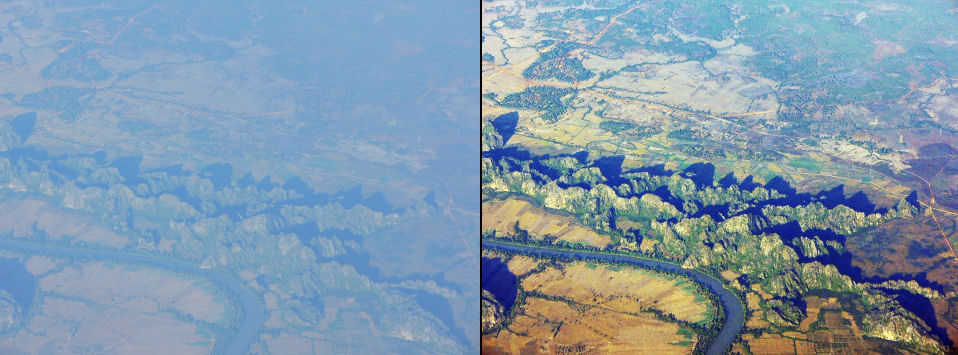
To
give you one example how much is possible, a picture which I took
from a plane, before and after correction.
So
don't delete your pictures to soon, thinking they are no good.
Digital cameras have difficulties in low contrast (as landscapes
from a distance)
and
high contrast situations (especially buildings against an overcast
sky).
There are several (even free) programs who can easily correct these
kind of problems.
Sometimes portrait pictures can also do well with some improvement.
Of
course this is also a question of taste, so you can adjust it your
way.
I
have tested MANY programs, known and virtually unknown, during the
last 10 years and improved hunderd of thousands of pictures. Here
are my favorite programs:
If you want free software
Irfanview is
a good program, which can do a lot with pictures: improve, viewer,
slideshow, photo and web albums.
Irfanview is
also easy to use. This is my standard software for quick picture
viewing and simple picture manipulation as cropping, resizing, gamma
correction and enhancing. This can be done also batch wise for a
series of pictures. It is important also to download the plug-ins!
You can also use photoshop plug-ins in this program.
A general program which I really like is
ACDSee Pro. This is an all-in solution with many possibilities
and very easy to use. I use this for the photo collages in this web,
flash slideshows, text in pictures, organizing and so on.
There is no program which can handle all the difficult lightning
situations, so depending on the circumstances there are more
options.
An excellent plug-in is
AutoEye ($ 129). Not cheap. but it can do sometimes
miracles to your pictures.
Irfanview works good and easily in low contrast situations.
If you are interested in the perfect portrait
Portrait
Professional ($45) is a really great program, see also
Dream Girls.
Another series of software I use is
Nik Software's award-winning products: Dfine® 2.0, Viveza™,
Color Efex Pro™ 3.0. Especially Viveza works very easy to enhance
parts of a picture. It gives very natural effects. Great program.
Dfine is very good in removing noise by higher ISO's.
ColorWasher is a plugin for correcting the colors, contrast,
exposure and saturation, which I use in low contrast pictures, e.g.
landscapes from a distance. It can do miracles, but takes time to
learn.
Note: prices are an indication. Actually prices change all the time,
depending also were you live.
More examples of photo
enhancing

To demonstrate in more detail of what this software is capable of, I
have made a slideshow with pictures of the popular DSLR Canon EOS
400D and the superzoom Panasonic FZ-8, taken by others. Why I have
chosen these cameras? Because the pictures of my Olympus SP-550,
taken at the same places are mostly better and I want to demonstrate
what is possible with these photo enhance programs.
Especially the popular DSLR Canon EOS 400D has difficulties with the
color balance, having mostly a yellow cast and also difficulties
with low and high contrast situations.
You can also see that simple enhancing as cropping of uninteresting
parts, getting the horizon straight and not on the half of the
picture works fine.
Sometimes I wanted to ‘dramatize’ the photo to enhance the magical
and mystical energy of the place.
I have used the following software for it: the free Irfanview,
Colorwasher and Viveza. Most of the time with just one or a few
clicks. In a few examples I used Autoeye and the gradient filter of
Color Efex Pro. For more info see above.
This proves again that if you want great
pictures in an easy and cheap way use one of the Olympus superzooms
(the newest SP-800UZ with 30x optical zoom) and the above mentioned
software.
In the slideshow you see first the original photo (uneven numbers)
and then the enhanced picture (even numbers).
Viewing hints: Press F11 to see the
full screen. In the slideshow window you can start or stop the
slideshow with the space bar. You can also use the arrow keys <- ->
(on your keyboard or screen) or the mouse wheel for step by step
viewing.
Showing your pictures
There are many ways of presenting your digital photos. There is
software to help you with that: from a kind of imitation of the old
photo album to the more sophisticated way of
making a slideshow on DVD. I use the excellent
Photodex Proshow Gold ($ 70) or Producer for that. This is
really a great piece of software with many possibilities, and it is
also easy to use. It is possible to zoom and pan together, which
gives a result that almost looks like a movie.
It has many ways of transition of the scenes and of course
titles and music are also possible. The quality of the
slideshow on the DVD is very good and stays good, also during strong
zooming and panning. Seeing the results on my big flat screen Sony
Wega TV, I was really stunned.
If
you want it really easy and almost automatic
then
Ulead’s DVD Movie factory ($ 50) is also a good choice, although
the possibilities are rather limited compared with ProShow. This
program can also handle many kinds of video: digital video,
(Super)-VHS and so on.
Web galleries
I f you want to make web galleries,
you can use
Arles
Image Web Page Creator (Free).
My
vision on camera and software
Don't think that the expensive Adobe Photoshop
and Lightroom software, expensive DSLR cameras and more megapixels
give better results. The contrary is often the case. Try for
example to do the portrait improvements, which I could do (as a
first time user) immediately due to the extreme user friendliness of
the Portrait Professional program in Adobe Photoshop (especially
when you are also a first time user). It will take your ages or you
will not succeed at all in getting the same results, see also
dream girls for more examples. Even
the free Irfanview does it as photo enhancer mostly better then
Photoshop.
As a multimedia producer I use many different kind of programs,
therefore user friendliness and intuitive use are very important for
me.
I am always surprised about what I call the
Adobe pushing and
the way the professionals make it themselves
difficult (photo and video) with these big and expensive
cameras.
I have now a
12 Megapixel Olympus SP-590 with 26x optical zoom and as I
experienced it, you can do things with this camera you can’t do
easily with the other equipment. I travelled through Egypt with two
photographers with all this expensive and heavy equipment. They were
so busy with changing their lenses, getting the fine dessert dust
from their mirrors and so on. In that time I had already taken many
good shots, and such a relatively small camera draws not that
attention as these big ones. Especially important in Egypt and with
the amazing 26x double stabilized zoom you can take pictures of
people, which you can’t with the other camera’s. And the camera just
fits in my money belt. Back home comparing our pictures I had many
more good pictures then they had.
Of course when you have to make large prints, then a full frame camera
could be necessary. But several of mine pictures are published
in magazines and books with excellent results.
Also under very low light the DSLR’s have advantages. But I have
used 3200ASA, improved with Nik Dfine2 with good results.
This excellent free magazine. together with the
Photography blog is an excellent source of information. Also the
tests are excellent. Because the magazine has no advertisements,
they are able to give unbiased information:
BRIDGE CAMERAS: BUSTING
THE DSLR CAMERA MYTH b y Jon D. Ayres
Most photography magazines tend to push dSLR cameras as if they
are the only game in town for taking quality photos. Yet, almost
every camera manufacturer makes at least one prosumer bridge camera.
From all the how-to manuals on photography and magazines about
photography, it seems as if the prosumer bridge camera is the
unwanted child in photography. Yet among many photographers,
prosumer bridge cameras are some of the most popular cameras in the
world today.
(Quote from the intro). I highly recommend you to read this
excellent article, starting on page 11.
I am happy to read that independent sources are on the same line. At
the end of this page is in sharp contrast another article: Popular
Photographer (How to make great pictures!!) of December 2009
Adobe pushing.
Now some more about the Adobe pushing.
If you read most of the photo magazines, even for
beginners, it looks like there is only one program you can enhance
your pictures with, and that is Adobe Photoshop (sometimes also
Lightroom). I have Adobe Photoshop and Lightroom 2.5 and I find them
user unfriendly and complicated programs with mostly inferior
results. To give on example: I wanted to make the new
favorite selection
with automatically adjusting pictures to the screen seize
(nowadays between 800x600
till 1920x1280). Till my surprise I found in Adobe Lightroom a good
possibility for it. But the way it worked was so clumsy and slow
that I looked further into it. It turned out not to be of Adobe but
from
Simpleviewer, what of course explains why it was so good. So I
went to the original small FREE program, coupled that with another
free program
Porta
and what took me four hours to render in Lightroom, did this free
combination in 90 seconds, in a MUCH better way. Now I had
exactly the results in the way I wanted, which was not possible with
the expensive Lightroom. But you read (almost) NEVER about these
kind of programs in photo magazines. Even for beginners they start
with Adobe Photoshop, which I find a shame. My beginner friends and
I use the great free
Irfanview
for all the basic things. In a split second it is there (1MB!) and
you can start in an easy way to do the basic things like loose free
cropping, rotating or resizing using the superior Lanczos5 method.
Very good automatic picture adjusting (especially in low contrast)
and so on. I also don't use RAW and except a few cases, I don't see
any advantage in that. Only much more memory is needed and much more
complicated. The Olympus SP-550/ SP-590 jpg has a very natural color
balance (as the color difference charts clearly show) and under
difficult lightning conditions the above mentioned programs perform
miracles as my pictures clearly show.
State of the art photos and photo
presentation (21-2-2010)

Have first a look at this slideshow.
From a technical viewpoint these are (at this moment in time)
state of the art photos and this is a
state of the art photo presentation.
The pictures have been taken with an Olympus SP-590 with 26x optical
zoom: 26-676mm, double stabilized and with a speed of 10 f/s,
maximum 25 frames. (Price about $ 340). This is a great combination
as for example the photos of the birds in the KL bird park clearly
show. I never use a tripod.
Also the way of presenting the pictures, automatically adjusting to
almost every screen seize is according to me state of the art, which
FREE easy working software. This automatically adjusting is very
important nowadays with the huge variety in screen resolutions. To
optimize the pictures also free programs are used like Irfanview,
that for example with one click transforms the foggy pictures from
the KL Minera tower in great looking pictures.
The joke is somehow that most of the so called professionals and
serious photographers don’t use these kinds of cameras and don’t use
these kinds of programs.

On the left an example how I make my slideshows with free, easy to
use software and to the right how a large travel organization
did it in the professional way. My picture is 1350%
larger and also in every detail better (texts, navigation, slideshow
speed, thumbnails etc). Indeed a joke!
And to be honest I didn't try to find the worst one on the Internet.
I want to go to Morocco and went to a well known travel organization
to get more
information. And this is what I found!
Popular Photographer (How to make great pictures!!) December 2009
Buying a Popular Photographer (How to make great pictures!!) December 2009 on my travel, it looks there are
(almost?) only DSLR cameras and Adobe Photoshop.
I must really laugh if I see a two pages test picture with the Leica
M9 (which cost with 50mm noctilux f/0.9 $ 17.000). This picture is
in my eyes in EVERY way bad: bad composition (hands cut off,
distracting parts) low contrast, parts are too dark, color cast etc.
And if you buy such an incredible expensive camera you discover it
is FULL of serious bugs (see press release below). Looking to
the number 1.116 , it is one of a series of updates for the Leica
M9!
With my Olympus ultrazoom cameras, I NEVER needed to update the
firmware.
So probably what I wrote about the bad quality of the test picture
in Popular Photography can be partially blamed on this firmware too.
Original press release March 2010:
Leica has released a firmware update for the Leica M9
interchangeable-lens digital rangefinder camera. Version 1.116
removes a magenta cast seen in the left half of the frame when
certain wide-angle lenses - including the 18mm f/3.8 ASPH; the 21mm
f/2.8 ASPH; the 24mm f/3.8 ASPH; the 28mm f/2 ASPH and the 28mm
f/2.8 ASPH - are used, introduces an ISO-dependent vignetting
correction feature, improves image quality in thumbnail display,
speeds up the SD card formatting process, and fixes bugs.
The name of the magazine is POPULAR photography, but I can’t read
ANYTHING about these great super zoom cameras. And the only photo
program mentioned is the expensive and very user unfriendly Adobe
Photoshop. This is not only the fault of Popular Photography. With a
few exceptions this is the trend in almost every photo magazine. I
read many photo magazines and some exceptions are
Photographybb onlinemagazine and Shutterbug. For
example in a test of ACDSee Pro 3, Shutterbug clearly mentioned how
easy important and often used corrections can be done in ACDSee Pro
3, with the remark: Try this in Photoshop!
|